

Image Segmentation and CLIPSeg Workflows#
Image segmentation is another helpful tool for finding patterns in images. If you are interested in learning what percent of an image is made up of a certain feature, like sky vs. ground, or you want to remove the background, segmentation is a go-to tool.
In this notebook, we’ll explore image segmentation using open source models with participatory science data like iNaturaist and NASA GLOBE Land Cover.
1. General Segmentation with Segment Anything Model (SAM)#
Let’s explore image segmentation with the Segment Anything Model, a model that has a wide range of applications and is able to segment all parts of an image to differentiate between different objects.
# Install required packages
!pip install -q segment-anything opencv-python matplotlib pillow requests
!pip install -q git+https://github.com/facebookresearch/segment-anything.git

import torch
import numpy as np
import matplotlib.pyplot as plt
from PIL import Image, ImageDraw
import requests
from io import BytesIO
import cv2
from segment_anything import sam_model_registry, SamAutomaticMaskGenerator, SamPredictor

# Load the Segment Anything Model
print("Loading SAM model... (this may take a moment)")

# Download model checkpoint
!wget -q https://dl.fbaipublicfiles.com/segment_anything/sam_vit_h_4b8939.pth

# Initialize SAM
model_type = "vit_h"
checkpoint = "sam_vit_h_4b8939.pth"
device = "cuda" if torch.cuda.is_available() else "cpu"

sam = sam_model_registry[model_type](checkpoint=checkpoint)
sam.to(device=device)
# Create mask generator for automatic segmentation
mask_generator = SamAutomaticMaskGenerator(
    model=sam,
    points_per_side=32,
    pred_iou_thresh=0.86,
    stability_score_thresh=0.92,
    crop_n_layers=1,
    crop_n_points_downscale_factor=2,
    min_mask_region_area=100,
)

print("Model loaded")

def load_image(url):
    """Load an image from a URL"""
    try:
        response = requests.get(url, stream=True)
        image = Image.open(BytesIO(response.content)).convert("RGB")
        return image
    except Exception as e:
        print(f"Error loading image: {e}")
        return None

def show_anns(anns, ax):
    """
    Visualize segmentation masks with different colors

    Args:
        anns: List of annotation dictionaries from SAM
        ax: Matplotlib axis to draw on
    """
    if len(anns) == 0:
        return

    # Sort by area (largest first)
    sorted_anns = sorted(anns, key=(lambda x: x['area']), reverse=True)

    # Create colored mask overlay
    img = np.ones((sorted_anns[0]['segmentation'].shape[0],
                   sorted_anns[0]['segmentation'].shape[1], 4))
    img[:, :, 3] = 0  # Transparent background

    for ann in sorted_anns:
        m = ann['segmentation']
        # Generate random color for each segment
        color_mask = np.concatenate([np.random.random(3), [0.5]])  # 50% transparency
        img[m] = color_mask

    ax.imshow(img)

def create_mask_overlay(image, masks):
    """
    Create a visualization with colored segmentation masks overlaid on the original image

    Args:
        image: PIL Image
        masks: List of mask dictionaries from SAM

    Returns:
        PIL Image with overlay
    """
    # Convert PIL image to numpy array
    img_array = np.array(image)

    # Create overlay
    overlay = img_array.copy()

    # Sort masks by area
    sorted_masks = sorted(masks, key=(lambda x: x['area']), reverse=True)

    for mask_dict in sorted_masks:
        mask = mask_dict['segmentation']
        # Random color for each segment
        color = np.random.randint(0, 255, size=3)
        overlay[mask] = overlay[mask] * 0.5 + color * 0.5

    return Image.fromarray(overlay.astype(np.uint8))

def run_segmentation(image_urls):
    """
    Run SAM segmentation on a list of image URLs

    Args:
        image_urls: List of image URLs or single URL string
    """
    # Handle single URL
    if isinstance(image_urls, str):
        image_urls = [image_urls]

    for idx, url in enumerate(image_urls, 1):
        print(f"\n{'='*60}")
        print(f"Processing Image {idx}/{len(image_urls)}")
        print(f"URL: {url}")

        # Load the image
        image = load_image(url)
        if image is None:
            continue

        # Convert to numpy array for SAM
        image_array = np.array(image)

        # Generate masks
        print("Generating segmentation masks...")
        masks = mask_generator.generate(image_array)

        print(f"Found {len(masks)} segments")

        # Create visualization
        fig, axes = plt.subplots(1, 3, figsize=(20, 6))

        # Original image
        axes[0].imshow(image)
        axes[0].set_title("Original Image", fontsize=14, fontweight='bold')
        axes[0].axis('off')

        # Segmentation masks only
        axes[1].imshow(image)
        show_anns(masks, axes[1])
        axes[1].set_title(f"Segmentation Masks ({len(masks)} segments)",
                         fontsize=14, fontweight='bold')
        axes[1].axis('off')

        # Overlay on original
        overlay_img = create_mask_overlay(image, masks)
        axes[2].imshow(overlay_img)
        axes[2].set_title("Overlay on Original", fontsize=14, fontweight='bold')
        axes[2].axis('off')

        plt.tight_layout()
        plt.show()
Model loaded
# Apply segmentation to iNaturalist photos
example_urls = [
    "https://inaturalist-open-data.s3.amazonaws.com/photos/639462446/large.jpg",
    "https://inaturalist-open-data.s3.amazonaws.com/photos/639441608/large.jpg"
]

run_segmentation(example_urls)
============================================================
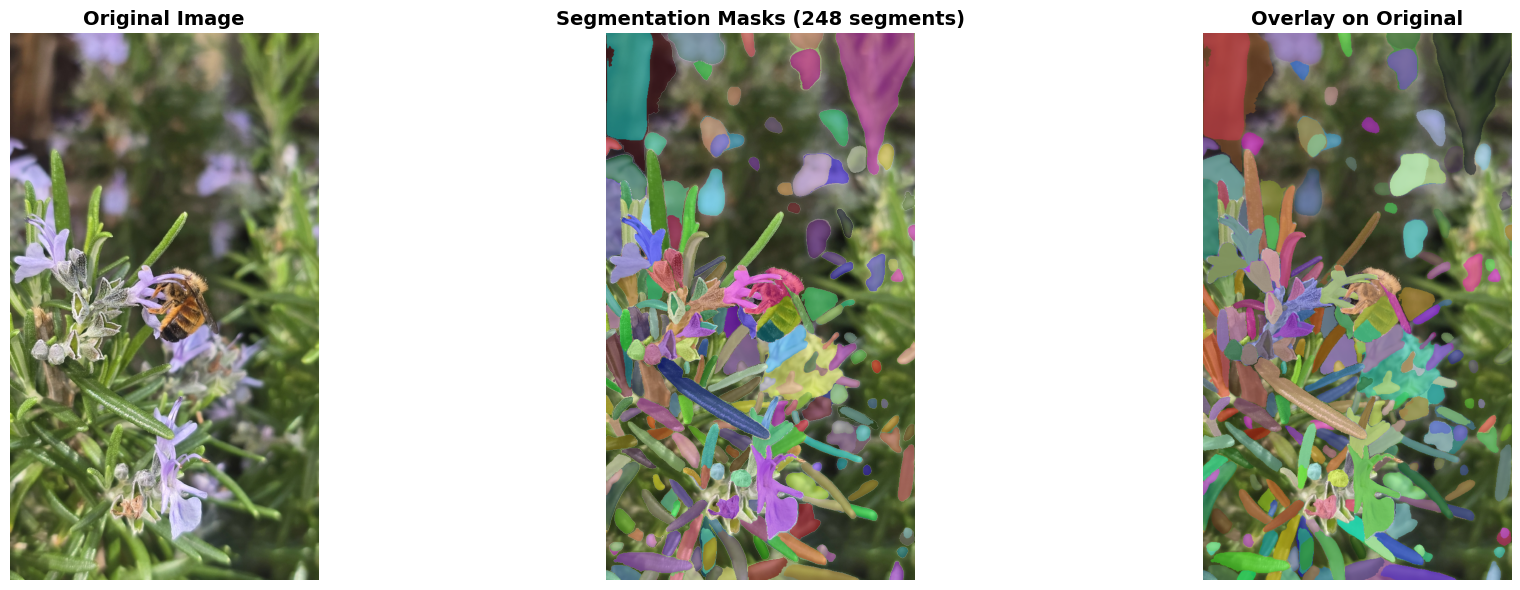
Processing Image 1/2
URL: https://inaturalist-open-data.s3.amazonaws.com/photos/639462446/large.jpg
Generating segmentation masks...
Found 248 segments
============================================================
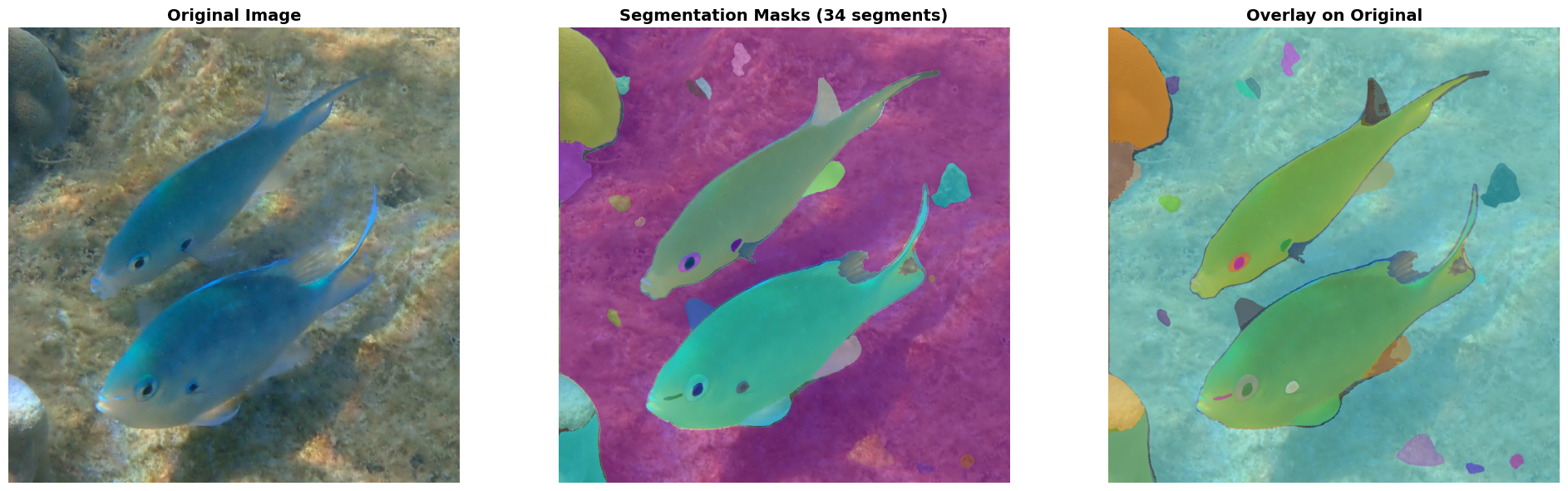
Processing Image 2/2
URL: https://inaturalist-open-data.s3.amazonaws.com/photos/639441608/large.jpg
Generating segmentation masks...
Found 34 segments
2. Prompt-Based Segmentation with CLIPSeg + SAM#
In the above example, we segmented everything in the image, including the main animal like the bee (image 1) and fish (image 2), as well as the background like flowers, leaves, and rocks. You might want to find a specific feature of an image, rather than all of these.
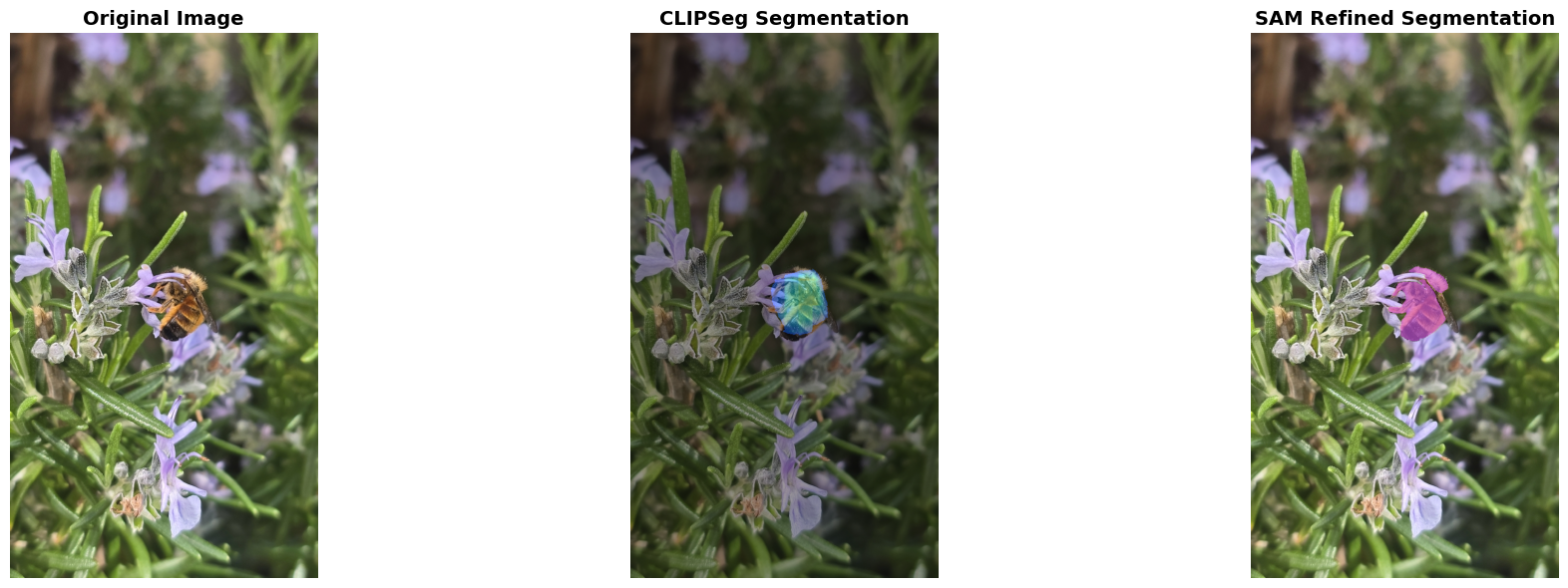
In the below example, we’ll explore how to segment an image to get a specific feature using a prompt. We’ll use the CLIPSeg model by Timo Lüddecke and Alexander Ecker. Then, after CLIPSeg identifies the specific feature, we’ll use SAM to refine the segmentation and get a more specific outline.
You can input the URL to an image and a prompt for what you want to find within the image, and the model will do the rest.
# Install required package
!pip install -q transformers

from transformers import CLIPSegProcessor, CLIPSegForImageSegmentation
import torch
from matplotlib import pyplot as plt
import numpy as np
from PIL import Image
import requests
from io import BytesIO

# Load CLIPSeg model
print("Loading CLIPSeg model for text-prompted segmentation...")

processor = CLIPSegProcessor.from_pretrained("CIDAS/clipseg-rd64-refined")
clipseg_model = CLIPSegForImageSegmentation.from_pretrained("CIDAS/clipseg-rd64-refined")

# Move to GPU if available
device = "cuda" if torch.cuda.is_available() else "cpu"
clipseg_model.to(device)

print("CLIPSeg model loaded successfully!")
print(f"Using device: {device}")

sam_predictor = SamPredictor(sam)

def segment_with_prompt(image_url, text_prompts, threshold=0.4, use_sam_refinement=True):
    """
    Segment objects in an image based on text prompts

    Args:
        image_url: URL of the image
        text_prompts: Single prompt string or list of prompts (e.g., "cat" or ["cat", "dog", "person"])
        threshold: Confidence threshold for segmentation (0-1, higher = more strict)
        use_sam_refinement: Whether to refine masks with SAM (better quality but slower)
    """
    # Convert single prompt to list
    if isinstance(text_prompts, str):
        text_prompts = [text_prompts]

    print(f"\n{'='*60}")
    print(f"Text Prompts: {text_prompts}")
    print(f"Image URL: {image_url}")
    print('='*60)

    # Load image
    image = load_image(image_url)
    if image is None:
        return

    # Prepare inputs for CLIPSeg
    inputs = processor(
        text=text_prompts,
        images=[image] * len(text_prompts),
        padding=True,
        return_tensors="pt"
    ).to(device)

    # Generate segmentation masks
    print(f"Generating segmentation masks for {len(text_prompts)} prompt(s)...")

    with torch.no_grad():
        outputs = clipseg_model(**inputs)

    # Get predictions
    preds = outputs.logits

    # Process each prompt's mask
    image_array = np.array(image)
    masks = []
    refined_masks = []

    for idx, prompt in enumerate(text_prompts):
        # Get mask for this prompt
        mask = torch.sigmoid(preds[idx]).cpu().numpy()

        # Resize mask to original image size
        mask_resized = np.array(Image.fromarray(mask).resize(image.size, Image.BILINEAR))

        # Apply threshold
        binary_mask = mask_resized > threshold
        masks.append((binary_mask, mask_resized, prompt))

        # Optionally refine with SAM
        if use_sam_refinement and binary_mask.sum() > 0:

            # Find bounding box of the mask
            coords = np.argwhere(binary_mask)
            if len(coords) > 0:
                y_min, x_min = coords.min(axis=0)
                y_max, x_max = coords.max(axis=0)

                # Use SAM to refine the mask
                sam_predictor.set_image(image_array)
                box = np.array([x_min, y_min, x_max, y_max])

                refined_mask, _, _ = sam_predictor.predict(
                    box=box,
                    multimask_output=False
                )
                refined_masks.append((refined_mask[0], prompt))
            else:
                refined_masks.append((binary_mask, prompt))
        else:
            if binary_mask.sum() > 0:
                print(f"Found '{prompt}'")
            else:
                print(f"'{prompt}' not detected (try lowering threshold)")

    # Visualization
    num_plots = 3 if use_sam_refinement else 2
    fig, axes = plt.subplots(1, num_plots, figsize=(7*num_plots, 6))
    if num_plots == 2:
        axes = [axes[0], axes[1]]

    # Original image
    axes[0].imshow(image)
    axes[0].set_title("Original Image", fontsize=14, fontweight='bold')
    axes[0].axis('off')

    # CLIPSeg masks with heatmap overlay
    overlay = image_array.copy().astype(float)
    combined_mask = np.zeros((*image.size[::-1], 3))

    for binary_mask, mask_resized, prompt in masks:
        if binary_mask.sum() > 0:
            # Generate unique color
            color = np.random.randint(50, 255, size=3)

            # Create colored mask
            mask_3d = np.stack([binary_mask]*3, axis=-1)
            combined_mask += mask_3d * color

            # Add heatmap overlay
            heatmap = plt.cm.jet(mask_resized)[:, :, :3] * 255
            overlay = overlay * 0.6 + heatmap * 0.4 * np.expand_dims(binary_mask, -1)

    axes[1].imshow(overlay.astype(np.uint8))
    axes[1].set_title("CLIPSeg Segmentation", fontsize=14, fontweight='bold')
    axes[1].axis('off')

    # SAM refined masks (if enabled)
    if use_sam_refinement and len(refined_masks) > 0:
        refined_overlay = image_array.copy()

        for refined_mask, prompt in refined_masks:
            if refined_mask.sum() > 0:
                color = np.random.randint(50, 255, size=3)
                refined_overlay[refined_mask] = refined_overlay[refined_mask] * 0.4 + color * 0.6

        axes[2].imshow(refined_overlay.astype(np.uint8))
        axes[2].set_title("SAM Refined Segmentation", fontsize=14, fontweight='bold')
        axes[2].axis('off')

    plt.tight_layout()
    plt.show()

    # Print summary
    print(f"\nSegmentation Summary:")
    for binary_mask, _, prompt in masks:
        coverage = (binary_mask.sum() / binary_mask.size) * 100
        if binary_mask.sum() > 0:
            print(f"  • '{prompt}': {coverage:.2f}% of image")
        else:
            print(f"  • '{prompt}': Not detected")
Let’s segment the bee, as well as the flowers and leaves, from the iNaturalist image!
example_url = "https://inaturalist-open-data.s3.amazonaws.com/photos/639462446/large.jpg"

print("\nExample: Segmenting 'bee' in the image")
segment_with_prompt(example_url, "bee", threshold=0.2)

print("\nExample: Segmenting multiple objects")
segment_with_prompt(example_url, ["bee", "flower", "leaf"], threshold=0.2)
Example: Segmenting 'bee' in the image

============================================================
Text Prompts: ['bee']
Image URL: https://inaturalist-open-data.s3.amazonaws.com/photos/639462446/large.jpg
============================================================
Generating segmentation masks for 1 prompt(s)...
Segmentation Summary:
  • 'bee': 1.67% of image

Example: Segmenting multiple objects

============================================================
Text Prompts: ['bee', 'flower', 'leaf']
Image URL: https://inaturalist-open-data.s3.amazonaws.com/photos/639462446/large.jpg
============================================================
Generating segmentation masks for 3 prompt(s)...
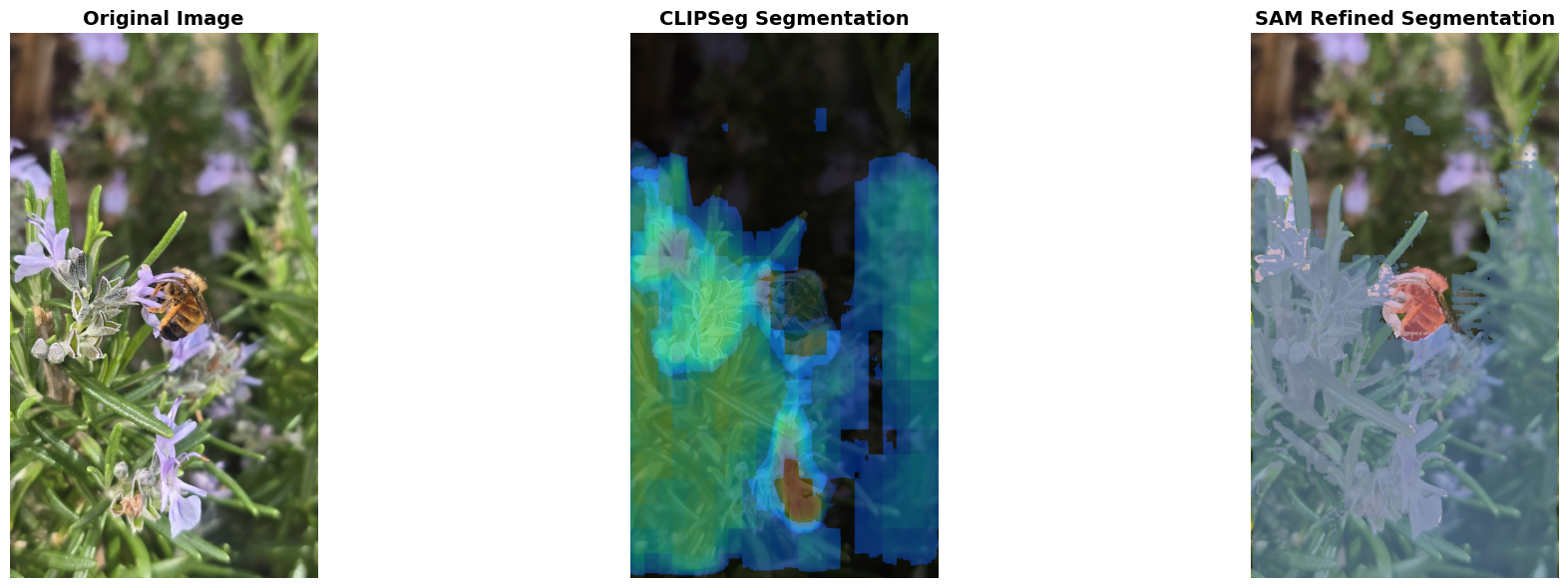
Segmentation Summary:
  • 'bee': 1.67% of image
  • 'flower': 16.67% of image
  • 'leaf': 60.90% of image
This model is also helful for understanding landscapes. Let’s test it on an image submitted to NASA GLOBE Observer’s Land Cover participatory science initiative.
example_url = "https://data.globe.gov/system/photos/2024/12/31/4325697/original.jpg"

print("\nExample: Segmenting 'snow' in the image")
segment_with_prompt(example_url, "snow", threshold=0.2)

print("\nExample: Segmenting multiple objects")
segment_with_prompt(example_url, ["snow", "tree", "sky"], threshold=0.2)
Example: Segmenting 'snow' in the image

============================================================
Text Prompts: ['snow']
Image URL: https://data.globe.gov/system/photos/2024/12/31/4325697/original.jpg
============================================================
Generating segmentation masks for 1 prompt(s)...
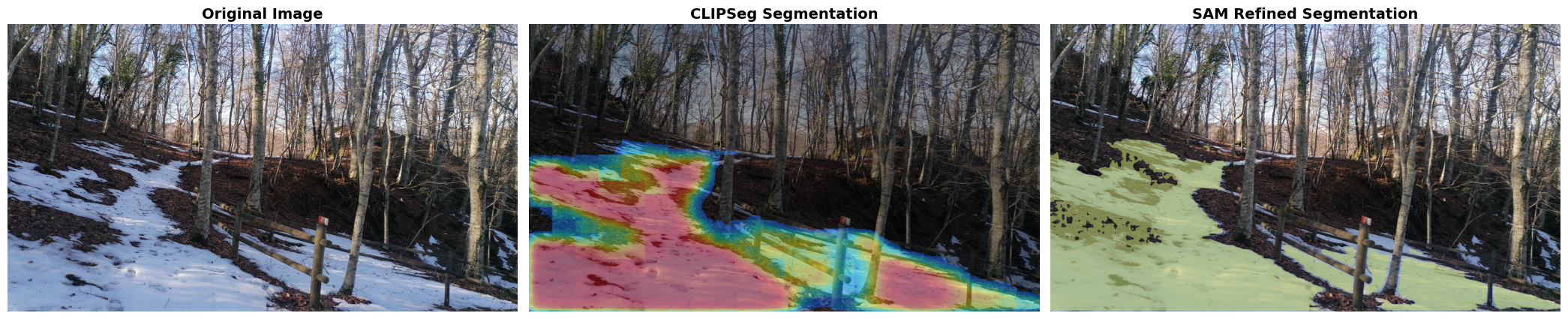
Segmentation Summary:
  • 'snow': 34.45% of image

Example: Segmenting multiple objects

============================================================
Text Prompts: ['snow', 'tree', 'sky']
Image URL: https://data.globe.gov/system/photos/2024/12/31/4325697/original.jpg
============================================================
Generating segmentation masks for 3 prompt(s)...
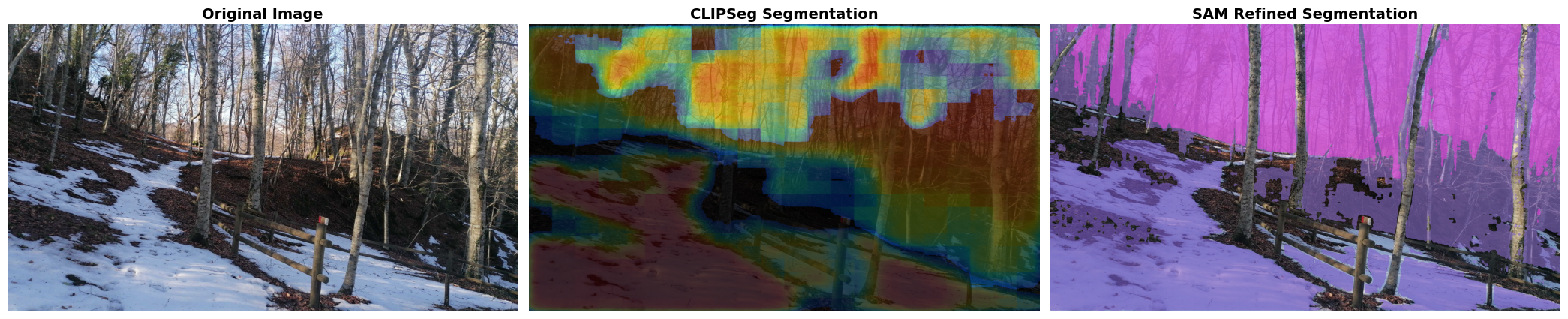
Segmentation Summary:
  • 'snow': 34.45% of image
  • 'tree': 60.63% of image
  • 'sky': 26.07% of image
To use this code for your own images, you can adjust the following code:
image_url = "link to image"
prompts = ["prompt 1", "prompt 2"]
threshold = 0.2   # Increase to filter out less-confident segmentations

segment_with_prompt(image_url, prompts, threshold=threshold)